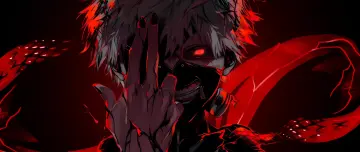
An intense close-up shot of an anime character with glowing red eyes framed by black and white hair. Smoke and subtle embers drift around the face, creating a fierce and menacing atmosphere. Fiery Demon Slayer Glare brings black and grey tones to your screen in a clean anime composition. It is a 3.4-second video at 60 fps, delivered as an MP4 with no sound; the loop restarts from the first frame. The file is 4080×2032 pixels; our check shows it was upscaled, so it is labelled honestly. Its proportions suit 21:9 ultrawide monitors. Balanced brightness keeps app icons and widgets readable during the day and at night. Themes: dark, smoke, red, anime, black and white. Download the MP4 free and set it with your phone’s gallery, a live wallpaper app, or a desktop app such as Lively Wallpaper or Wallpaper Engine.
How to set this live wallpaper
- Download the MP4 and open it in the Gallery app.
- Tap ⋮ (More) → Set as wallpaper, then choose Lock screen.
- Samsung trims videos longer than 15 seconds for the lock screen.
- Download the MP4.
- Install a free “video wallpaper” app from Google Play.
- Pick the MP4 in the app and set it for the home or lock screen.
- iPhone can’t use an MP4 as a wallpaper directly, so turn it into a Live Photo with a free converter app from the App Store.
- Open Settings → Wallpaper → Add New Wallpaper → Photos and choose the Live Photo.
- Make sure Live Photo is switched on; it plays when you wake the lock screen.
- Download the MP4.
- Windows: open it in a free app such as Lively Wallpaper (Microsoft Store) or Wallpaper Engine (Steam).
- Mac: use a live wallpaper app from the Mac App Store and add the MP4.